Monthly Membership
$150 / month
The current B4 tools now; the full B4 V4 line-up, including B4 Order Flow, after NinjaTrader approval.
Billed monthlyBuy nowFrom technical signals and market structure to footprint analysis and strategy execution with B4 CoPilot Pro, B4 Signals brings specialized trading products into one connected workflow.
Platform support varies by product. No indicator can guarantee a trading outcome.
This Black Friday, B4 Signals is opening the door to more ways to access our trading technology.
Choose the membership that fits your needs:
The current B4 tools now; the full B4 V4 line-up, including B4 Order Flow, after NinjaTrader approval.
Billed monthlyBuy nowSave $53 versus paying monthly. The current B4 tools now; the full B4 V4 line-up, including B4 Order Flow, after NinjaTrader approval.
Billed every 3 monthsBuy nowOur best value: save $903 versus paying monthly. The current B4 tools now; the full B4 V4 line-up, including B4 Order Flow, after NinjaTrader approval.
Billed annuallyBuy nowA single payment for the current B4 membership products. B4 Quantum is included when it is released; other new products and future major versions may require a separate purchase.
B4 Quantum — coming soon. One-Time members get pre-release access when it is available, and B4 Quantum when it is released.
Single payment, not a subscription; presale purchases include the B4 V4 line-up when NinjaTrader approves it · One-Time Sale termsBuy nowShips now
Arrives with B4 V4 after NinjaTrader approval
B4 Quantum — coming soon. One-Time: pre-release access when it is available.
Whether you're joining B4 for the first time or continuing your journey with us, this Black Friday is about choosing the membership and tools that fit your trading goals.
For educational purposes only. Not trading advice. Trading involves risk. Membership benefits, platform compatibility and promotional terms apply.
Explore the B4 lineup by job to be done. Each of the ten tools has a specific role, listed on its product card below.
Explore B4 Algo Pro, B4 Ichimoku, B4 Indicator Pro and B4 PriceLine for trend, pattern and market-structure context.
Explore analysis tools →▥Explore B4 Auction Pro and B4 Order Flow: footprint, volume profile, TPO, the tape and the DOM, for understanding activity at price.
Explore order-flow tools →⌁Explore B4 CoPilot Pro, the strategy execution engine, with B4 Confirmation for a second chart's view and B4 Order Flow for hands-on trade management.
Explore execution tools →The B4 lineup is built for NinjaTrader 8. The B4 TradingView indicators are discontinued.
Filter by role, then select any tool for its full description. See how they work together in The B4 Quantum Field.
Know the trend, the levels and the context before you take a trade.
Best for Traders who want one trusted read of the market before anything else goes on the chart.
Precision Squeeze Detection. Explosive Momentum. Breakout Intelligence.
Best for Traders who want to find the compression, read the momentum and plan the breakout in one panel.
See the auction: where the volume traded and who was in control at every price.
New liquidity tools · Presale · ships after NinjaTrader approval Liquidity Strength Lines, Persistent Liquidity Trails, Liquidity Bubble Markers, Hold vs Failure states, Nearest Liquidity Labels, Liquidity Memory
Best for Order-flow traders who read the market as an auction and want profile, footprint and liquidity on one chart.
Price, its halo and the levels that matter. Nothing else.
Best for Traders who like a clean chart that still knows where the levels are.
The whole B4 Ichimoku method on one chart.
Best for Ichimoku traders who want trend, structure and patterns in one indicator.
Let a second chart confirm a setup before your strategy acts.
Best for B4 CoPilot Pro users who confirm setups on more than one chart.
Signals in. Discipline out. Your rules, run the same way every time.
Best for Traders who want their rules carried out the same way, every time.
The AI Automated Trade Desk. Coming soon.
Best for Members who want the whole B4 toolkit working together as one desk.
Hear the tape, see the liquidity and find the next setup, in one window.
Best for Order-flow traders who live in the tape and on the ladder.
Build your charts on the same bars as the B4 charts and lessons.
Best for Traders who want their charts to match the B4 charts, templates and lessons.
The B4 TradingView indicators are discontinued: they are no longer updated or supported. The B4 lineup is built for NinjaTrader 8.
In B4 V4, after NinjaTrader approval: every tool and feature below is part of one of the nine B4 products for NinjaTrader 8, each found in the installed product under the name shown. B4 Quantum is coming soon. Select a product card above for its own list.
| Product | Tool or feature | Formerly sold as | Where to find it |
|---|---|---|---|
| B4 Algo Pro | B4 Algo Pro | B4 Algo (original NinjaTrader indicator) | Indicators: B4 Algo Pro |
| B4 Algo Pro | ML signals | Strategy: Show ML Signals | |
| B4 Algo Pro | B4 Levels | group B4 Levels | |
| B4 Algo Pro | B4 Brackets | group B4 Brackets | |
| B4 Algo Pro | B4 Brackets 24/7 | B4 Brackets: Brackets: 24/7 (include overnight) | |
| B4 Algo Pro | Bracket rotation alert and warning | B4 Brackets: Alert on bracket rotation | |
| B4 Algo Pro | B4 Ichimoku cloud | group B4 Ichimoku | |
| B4 Algo Pro | HUD with bracket countdown | group Heads Up Display (HUD) | |
| B4 Algo Pro | B4 Sentiment (off by default) | group B4 Sentiment | |
| B4 Algo Pro | Exhaustion markers | on the price chart | |
| B4 Algo Pro | Built-in publishing to the B4 tools | automatic (B4 Order Flow reads it) | |
| B4 Algo Pro | B4 CoPilot Pro integration | group B4 CoPilot Pro Integration | |
| B4 Indicator Pro | B4 Indicator Pro | B4 Indicator (free v3 indicator) | Indicators: B4 Indicator Pro |
| B4 Indicator Pro | B4 Squeeze (B4's own adaptive squeeze) | B4 Squeeze (NinjaTrader indicator) | group 26. B4 Squeeze |
| B4 Indicator Pro | Squeeze cloud, dots and release markers | groups 06. Squeeze cloud, 07. Squeeze dots | |
| B4 Indicator Pro | B4 Surge / Calm Zone | group 11. B4 Surge / Calm Zone | |
| B4 Indicator Pro | Trend Cloud | groups 00 / 10 / 15 | |
| B4 Indicator Pro | Trend Line | group 01. Trend Line | |
| B4 Indicator Pro | MACD-BB bands, momentum histogram | groups 03 / 04 / 05 | |
| B4 Indicator Pro | Fib SuperTrend | group Fib SuperTrend | |
| B4 Indicator Pro | RSI IFT trend | trend state inputs | |
| B4 Indicator Pro | Zones with ES / MES / NQ / MNQ values | groups 09.x Zones | |
| B4 Indicator Pro | Candle coloring | group 12. Bar coloring | |
| B4 Indicator Pro | Vertical event lines and context signals | groups 13 / 14 | |
| B4 Indicator Pro | Configurable alerts | group 16. Calculation, alerts | |
| B4 Indicator Pro | Buy and Sell triangles | price chart | |
| B4 Indicator Pro | Built-in B4 Order Flow outputs | automatic | |
| B4 Indicator Pro | Chart feed (off by default) | group 20. Chart feed | |
| B4 Indicator Pro | Signal Engine | Signal Engine settings | |
| B4 Indicator Pro | B4 CoPilot Pro integration | group 21. B4 CoPilot Pro Integration | |
| B4 Indicator Pro | Candle color from B4 Algo Pro | group 12. Bar coloring | |
| B4 Auction Pro | B4 Auction Pro footprint | B4 Auction Pro | group 22. Footprint |
| B4 Auction Pro | Session and custom volume profiles | groups 23 / 24 / 25. Profile | |
| B4 Auction Pro | Per-bar B4 value area | group 22.1 Value Area Colors | |
| B4 Auction Pro | Imbalances, stacked imbalances | groups 22.3 / 37 | |
| B4 Auction Pro | TPO time-at-price | group 51. TPO | |
| B4 Auction Pro | TPO signals (IB, poor highs / lows, single prints) | group 52. TPO Signals | |
| B4 Auction Pro | CVD confirmation | B4 CVD | group 20. CVD Confirmation |
| B4 Auction Pro | CUM delta divergence readout | group 16. Prop Desk Analytics: Show Cum Delta Divergence | |
| B4 Auction Pro | Prop Desk dashboard | group 16. Prop Desk Analytics | |
| B4 Auction Pro | B4 Squeeze zone | B4 Squeeze (3-minute squeeze zone) | group 58. Squeeze (B4) |
| B4 Auction Pro | Depth heatmap (B4 Book) | group 60 | |
| B4 Auction Pro | Flow heatmap (depth + prints) | group 64 | |
| B4 Auction Pro | Liquidity (Level 2) | group 70 | |
| B4 Auction Pro | Liquidity zones | group 41 | |
| B4 Auction Pro | Smart Exits | group 53 | |
| B4 Auction Pro | Virgin POC (B4) | group 54 | |
| B4 Auction Pro | MTF vPOC (B4) | group 56 | |
| B4 Auction Pro | HVN | group 9. HVN | |
| B4 Auction Pro | Up to 8 anchored VWAPs | group 34 | |
| B4 Auction Pro | Auto Levels | group 35 | |
| B4 Auction Pro | Opening Range (ORB) | group 63 | |
| B4 Auction Pro | Opening Drive | group 47 | |
| B4 Auction Pro | Trapped Traders | group 33 | |
| B4 Auction Pro | Aggression Arrows | group 39 | |
| B4 Auction Pro | Exhaustion & Absorption | group 40 | |
| B4 Auction Pro | Leg-to-Leg Profile | group 42 | |
| B4 Auction Pro | Momentum Deceleration | group 43 | |
| B4 Auction Pro | Large Prints & Sweeps | group 44 | |
| B4 Auction Pro | Confluence | group 45 | |
| B4 Auction Pro | Range Projection | group 46 | |
| B4 Auction Pro | Pullback Zones | group 48 | |
| B4 Auction Pro | Setups, risk and trade tracking | groups 4 / 6 / 12 | |
| B4 Auction Pro | Confidence Engine | group 14 | |
| B4 Auction Pro | Footer Table | group 59 | |
| B4 Auction Pro | Tape Strip | group 27 | |
| B4 Auction Pro | Macro Sessions | group 2 | |
| B4 Auction Pro | Candle Coloring | group 8 | |
| B4 Auction Pro | Four color palettes | group 36. Color Theme | |
| B4 Auction Pro | B4 Order Flow Markers | group 71 | |
| B4 Auction Pro | B4 Bars footprint | group 65 | |
| B4 Auction Pro | Swing Labels | group 66 | |
| B4 Auction Pro | Alerts | group 10. Alerts | |
| B4 Auction Pro | B4 CoPilot Pro outputs | group 11. B4 CoPilot Pro Integration (+ hidden signal companion) | |
| B4 PriceLine | B4 PriceLine | Indicators: B4 PriceLine | |
| B4 PriceLine | Price line and halo | group 1. Price line | |
| B4 PriceLine | Levels | group 2. Levels | |
| B4 PriceLine | Stop distance | group 3. Stop distance | |
| B4 PriceLine | Exit feed | group 4. Exit feed | |
| B4 PriceLine | B4 Order Flow feed | automatic | |
| B4 PriceLine | B4 CoPilot Pro integration (off by default) | group B4 CoPilot Pro Integration | |
| B4 Ichimoku | B4 Patterns | group 1. B4 Patterns | |
| B4 Ichimoku | Chikou Box | 1. B4 Patterns - 08 Chikou Box Settings | |
| B4 Ichimoku | Risk Management / levels | 1. B4 Patterns - 05 Risk Management | |
| B4 Ichimoku | Smart Mode | 1. B4 Patterns - 04 Smart Mode AI | |
| B4 Ichimoku | B4 KISS (KISS Pro) | B4 KISS | group 2. B4 KISS |
| B4 Ichimoku | Orderflow Engine | 2. B4 KISS - 3b. Orderflow Engine | |
| B4 Ichimoku | Stop-Loss | 2. B4 KISS - 3. Stop-Loss | |
| B4 Ichimoku | Kijun Heat Map | 2. B4 KISS - 6. Kijun Heat Map | |
| B4 Ichimoku | Beacon Radar + Entry Line | 2. B4 KISS - Beacon Radar + Entry Line | |
| B4 Ichimoku | Rhythm Failure Reversals | 2. B4 KISS - Rhythm Failure Reversals | |
| B4 Ichimoku | B4 Wave | B4 Wave | group 3. B4 Wave |
| B4 Ichimoku | B4 Shoyu | B4 Shoyu | group 4. B4 Shoyu |
| B4 Ichimoku | Kyushu Sushi Roll inside B4 Shoyu | 4. B4 Shoyu - Kyushu Sushi Roll | |
| B4 Ichimoku | Hosoda Cycles | 4. B4 Shoyu - Hosoda Cycles | |
| B4 Ichimoku | ABC Pattern | 4. B4 Shoyu - ABC Pattern Settings | |
| B4 Ichimoku | KISS Line | 4. B4 Shoyu - KISS Line Settings | |
| B4 Ichimoku | Kijun Flat | 4. B4 Shoyu - Kijun Flat Settings | |
| B4 Ichimoku | Advanced Ichimoku Techniques | 4. B4 Shoyu - Advanced Ichimoku Techniques | |
| B4 Ichimoku | Candle colors from | group 0. B4 Ichimoku | |
| B4 Confirmation | B4 Confirmation | Indicators: B4 Confirmation | |
| B4 Confirmation | Built-in relay in B4 CoPilot Pro | B4 CoPilot Pro (relay, off by default) | |
| B4 CoPilot Pro | B4 CoPilot Pro | B4 CoPilot Pro (vendor build) | Strategies: B4 CoPilot Pro |
| B4 CoPilot Pro | Imbalances | group Imbalances | |
| B4 CoPilot Pro | Strategy | group Strategy | |
| B4 CoPilot Pro | Tape Filters | group Tape Filters | |
| B4 CoPilot Pro | Machine Learning | group Machine Learning | |
| B4 CoPilot Pro | Risk Management | group Risk Management | |
| B4 CoPilot Pro | Session | group Session | |
| B4 CoPilot Pro | Entry Guard + Tape Watch | group Entry Guard + Tape Watch | |
| B4 CoPilot Pro | Use Chart Indicators | group Strategy | |
| B4 Order Flow | The Tape | Control Center > New > B4 Order Flow | |
| B4 Order Flow | The DOM | B4 Order Flow window | |
| B4 Order Flow | The Scanner | B4 Order Flow window | |
| B4 Order Flow | B4 Order Flow window | Control Center > New > B4 Order Flow | |
| B4 Order Flow | Market squawk (224 statements) | Tape settings | |
| B4 Order Flow | 36 tape-reading detectors | Tape settings | |
| B4 Order Flow | Event Memory | Tape | |
| B4 Order Flow | Scalp readout at B4 Algo Pro levels | Tape | |
| B4 Order Flow | Cross-market context (optional) | Tape settings | |
| B4 Order Flow | Position-aware voice | Tape | |
| B4 Order Flow | Bracket-aware voice | Tape | |
| B4 Order Flow | B4 CoPilot Pro watch chip | Tape | |
| B4 Order Flow | Trade Confirm | Control Center > New > B4 Trade Confirm | |
| B4 Order Flow | DOM trade controls | DOM | |
| B4 Order Flow | Smart Stop (suggest only) | DOM | |
| B4 Order Flow | GEX levels on the DOM (off by default) | DOM settings file | |
| B4 Order Flow | Double-click warning | automatic | |
| B4 Order Flow | Feeds readout (8 tools) | Tape, DOM and Scanner | |
| B4 Bars | B4 Bars | B4 Bars | Data Series: bar type B4 |
B4 Order Flow puts a tape with an audio squawk box, a Level II DOM and a market scanner in one NinjaTrader 8 add-on window, side by side or as tabs. It comes with every B4 membership (Monthly, Quarterly, Annual and One-Time) with B4 V4, after NinjaTrader approval.
Market levels, signals, order-flow evidence and context, explained out loud by the audio squawk box.
Explore the Tape →Inside B4 Order FlowLevel II depth and liquidity, with stop, exit and flatten controls. Order controls work on Sim101 and Playback101 accounts only in this release; live trading is not enabled.
Explore the DOM →Inside B4 Order FlowScan supported markets and surface potential opportunities using B4 signals and conditions.
Explore the Scanner →Already a B4 member? Your current B4 installs stay yours. Any B4 membership (Monthly, Quarterly, Annual or One-Time) adds B4 Order Flow and the rest of the B4 lineup with B4 V4, after NinjaTrader approval.
The Tape is the heart of B4 Order Flow, built around a powerful idea: traders should learn to understand what the market is doing, why it matters, and how the evidence connects to their trading system.
Its integrated Audio Squawk Box and tape-reading coach brings market commentary and educational analysis together, connecting Auction Market Theory, footprint reading, volume and TPO profiling, market microstructure, Ichimoku, and the broader B4 methodology.
With a library of 224 spoken order-flow statements across 11 categories, the Tape is designed to help traders understand relationships between indicators, price levels, order flow, and developing market conditions—not simply react to isolated alerts.
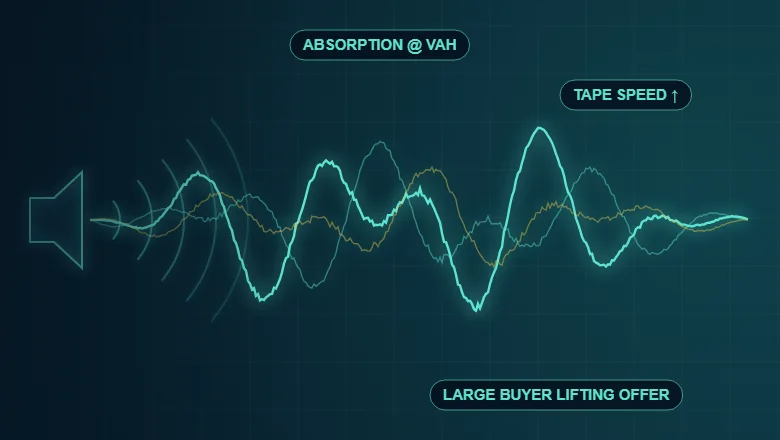
The squawk box is the centerpiece of the Tape. Its purpose goes beyond announcing that a signal fired: it helps explain the relevant evidence and reinforce the principles used to interpret it.
Study acceptance, rejection, balance, imbalance, price discovery, and the ongoing auction between buyers and sellers.
Understand how B4 indicators and compatible signals contribute to a broader analytical picture.
Learn to interpret buying and selling pressure, stacked imbalances, absorption, and other supported order-flow evidence.
Explore volume distribution, time-at-price structure, VAH and VAL, POC relationships, and important profile areas.
Study consolidation, compression, breakout attempts, acceptance, rejection, and failed moves.
Develop a deeper understanding of trend structure, Chikou Span relationships, confirmation, and the interaction of B4 signals with Ichimoku analysis.
Examine liquidity walls, liquidity vacuums, tape speed, aggressive participation, and changing market pressure.
Understand how multiple pieces of evidence can reinforce, weaken, or contradict a developing market scenario.
Recognize the interaction. Understand the context. Evaluate the confirmation.
The Tape's squawk library holds 224 statements in 11 categories, from order flow, footprint and absorption to the auction, swings, regime and confluence, built around the indicators and market information available on your chart.
Rather than evaluating each signal in isolation, these statements focus on relationships among price action, order flow, market structure, and the B4 analytical ecosystem.
The objective is to help traders understand what evidence is present, what confirmation may be missing, and when conflicting signals warrant caution.
The Tape is designed to connect technical information with the methodology behind its interpretation. Its educational approach distinguishes established B4 teaching principles from software-generated observations, helping users understand the difference between what an indicator reports, what the combined evidence suggests, and what still requires confirmation.
The audio experience is designed around different learning and analysis needs, including:
These modes are intended to adjust the depth and purpose of the commentary, not change the underlying evidence.
The Tape is designed to distinguish between a signal firing, a potential setup developing, confirmation being established, and an actual trade being executed. The Tape keeps these events clearly separate.
When supported data is available, commentary can explain the relevant signal, direction, price, source, and evidence, including subsequent confirmation or failure where the configured workflow supports it.
When information is missing, invalid, or conflicting, the Tape is designed to say so rather than present it as confirmed. The goal is clear, evidence-based market education—not unsupported predictions.
The Tape is the informational and analytical side of B4 Order Flow. It complements the trader's existing chart and execution environment while keeping its role separate from order management.
The Tape now follows the B4 Algo Pro levels, the B4 Trend Line and the order flow as one picture, and tells you where each setup stands: developing, confirmed, or invalidated, with the reason.
Each B4 Algo Pro level is tracked as price approaches, tests, rejects, breaks, retests or fails a break, with confluence and the room left to the next opposing level.
Setups respect the B4 Trend Line. A countertrend idea has to clear stricter rules before it is called confirmed.
Follow a scalp from developing to scalp confirmed or invalidated. The confirmed direction is spoken first; execution risk is reported separately.
Order-flow imbalance divergence becomes a full setup with follow-up conditions, and B4 Auction Pro's delta divergence is read at the bar close.
The Tape knows whether you are flat, long or short and phrases every callout from your position, naming the B4 Algo Pro levels and 24/7 brackets above and below you.
When you are ahead in a trade and an opposing setup appears, the Tape names a price where a stop could guard the open trade. It is a suggestion only; the Tape never moves an order.
Scenario setups with 7 confirmations: see at a glance whether a setup is confirmed, still building, not confirmed or out of date, plus the current squeeze status.
Every callout leaves a short marker at the right edge of your chart with a color-matched label: levels, setups, confirmations and invalidations.
An optional cross-market readout and commentary show when markets such as ES and NQ are confirming or diverging.
Watch lines are followed up with "as watched" or "no follow-through," and Volume Profile, TPO and footprint confirmations arrive faster.
B4 Indicator Pro signals, Trend Cloud arrows and Trend Line zone changes are announced as they happen, and every callout opens with "Still looking for long" or "Still looking for short."
Sounds, flashes and voice are fully customizable, source by source. Start quiet and turn on only what you want to hear. NQ's wider normal spread is handled on its own terms.
Also in development for the Tape:
The Tape stays informational; it never places, moves or cancels orders. Its readouts and suggestions are educational context for your own analysis.
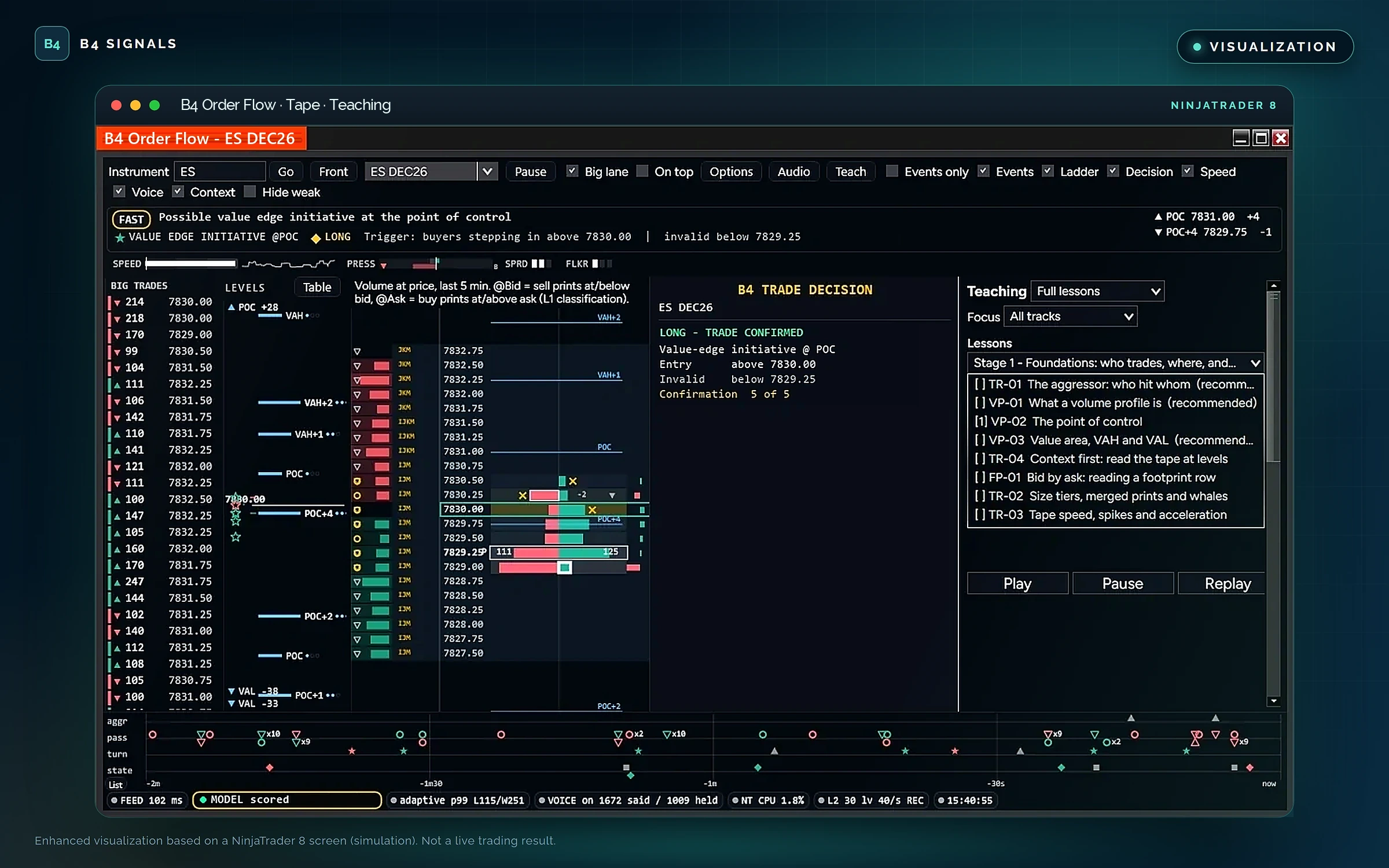
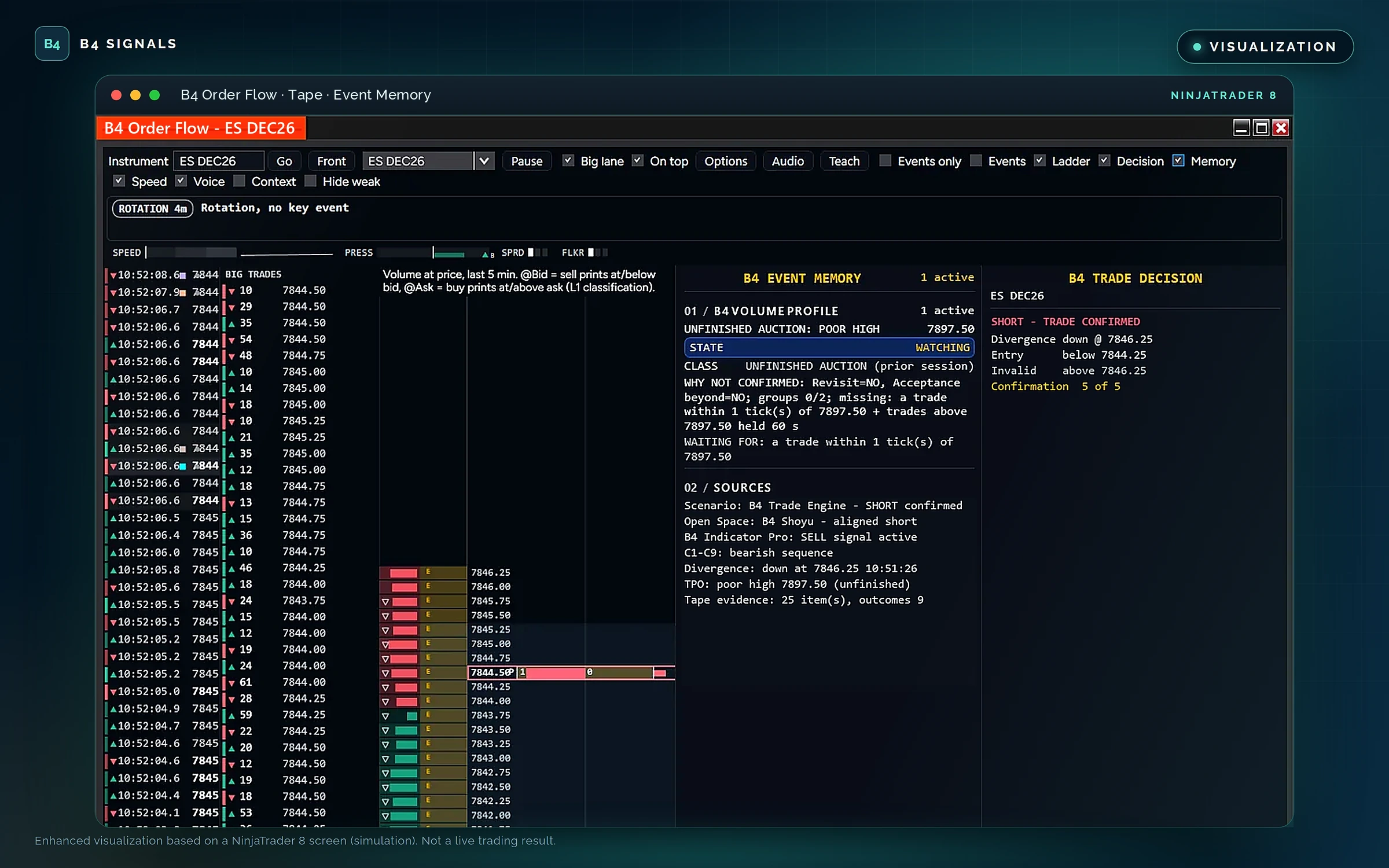
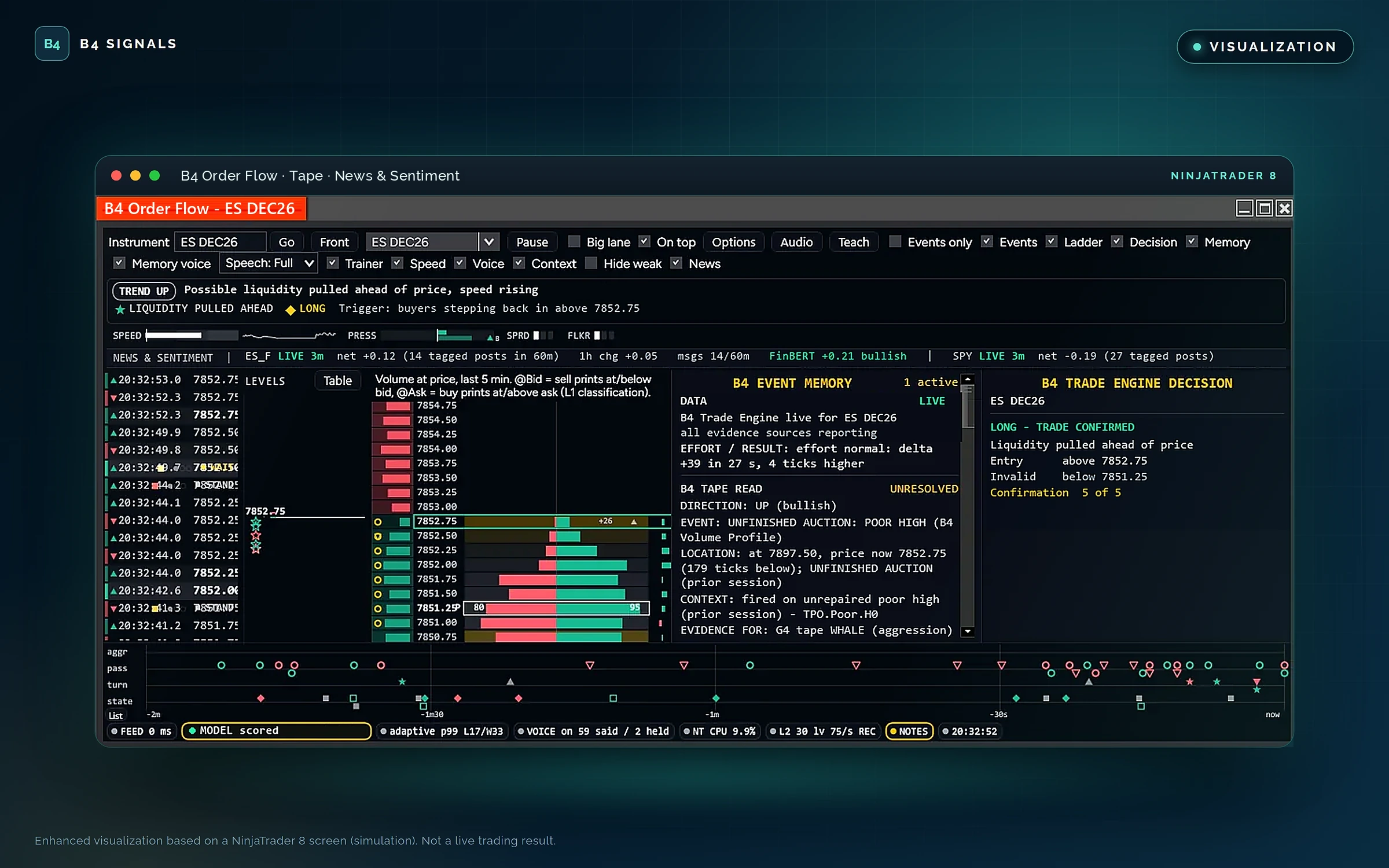
Enhanced visualizations based on NinjaTrader 8 screens from a simulation account (Sim101).
The Tape — 224 spoken statements. A powerful audio squawk box. Deeper understanding of the B4 system and the market auction.
For educational and research purposes only. Not trading advice. Market analysis and pattern recognition do not guarantee market direction or profitable outcomes. Features and audio modes may vary by release.
Built for traders who work directly from the order book, the DOM is designed to help you examine the relationship between resting liquidity, executed buying and selling, and the market's response as price moves through important levels.
It brings together the information needed to assess the order book, monitor changing liquidity, and manage supported trading actions within the NinjaTrader environment.
Understand how the resting order book changes as buyers and sellers compete for price.
Examine bid and ask liquidity across available price levels.
Observe changes in displayed liquidity as orders accumulate or are removed.
Follow how resting liquidity shifts across price levels.
Identify concentrations of displayed orders that may influence price behavior.
Compare bid and ask depth to evaluate displayed buying and selling interest.
Examine supported trade activity that may reveal aggressive participation.
Study displayed size that repeatedly refills at a price, and the related execution patterns, where the available data supports that analysis.
These observations provide context, not certainty. Displayed liquidity can change or disappear, and an apparent liquidity event does not guarantee a price reaction.
Market depth shows resting orders; executed trades show where transactions actually occur. The DOM is designed to help bring these perspectives together.
Complement depth information with compatible footprint and executed-volume analysis.
Examine situations where aggressive trading meets opposing liquidity and price response appears limited.
Evaluate supported buying-versus-selling activity and volume imbalances.
Assess changes in liquidity and aggressive participation as market conditions develop.
Compare order-book changes and executed flow with the market's actual movement.
The result is a more comprehensive view of market microstructure than displayed bid and ask quantities alone can provide.
The DOM also supports a focused trade-management workflow within NinjaTrader 8. Order controls work on Sim101 and Playback101 accounts only in this release; live trading is not enabled.
Available actions depend on your release, account, and configuration, and the supported order types and controls are documented with each release.
The DOM works with the rest of the B4 lineup:
Each component has a distinct role. The DOM provides its dedicated market-depth and trade-management interface; it does not replace the analytical or educational functions of the other B4 tools.
The DOM is designed around controlled trade-management workflows, actual NinjaTrader order states, and safeguards against invalid or duplicate actions. Supported controls are designed to respect your configured account and execution rules.
B4 Order Flow is a dedicated NinjaTrader 8 add-on—not a standalone web trading platform. Supported environments and account requirements are listed with each release.
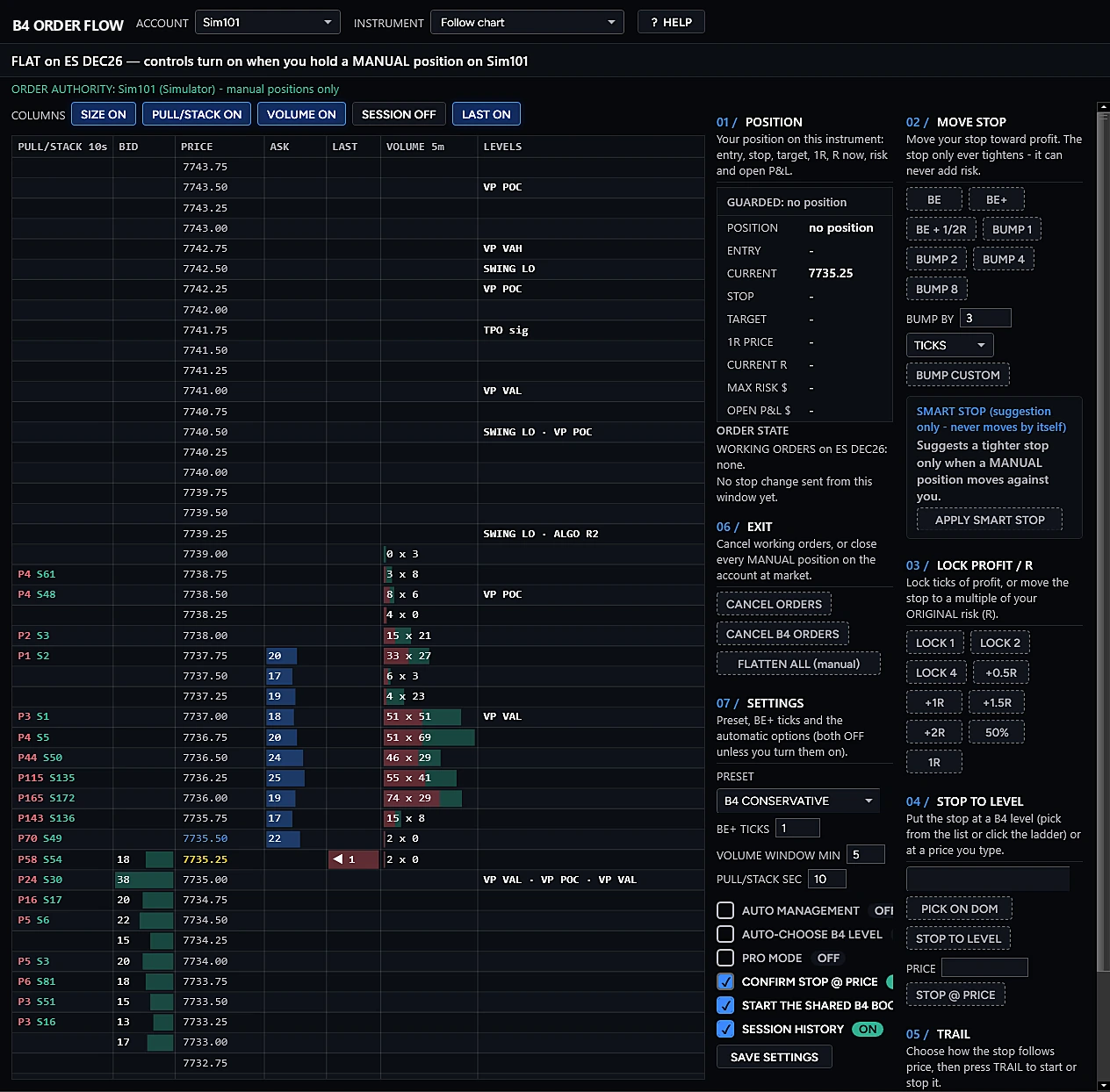
Enhanced visualization based on a NinjaTrader 8 screen from a simulation account (Sim101).
The DOM — liquidity and execution, inside B4 Order Flow.
For educational and research purposes only. Not trading advice. Market-depth information is incomplete and can change rapidly. Liquidity observations, order-flow analysis, and trade-management controls do not guarantee execution quality or profitable outcomes. Features may vary by release.
The Scanner in B4 Order Flow is designed to help traders monitor instruments, identify developing market conditions, and surface potential trading scenarios using the B4 analytical ecosystem.
Instead of manually reviewing every instrument and indicator, the Scanner is designed to organize relevant market information into a focused view, helping traders recognize where conditions may warrant closer attention.
By bringing compatible B4 signals and market-analysis criteria together, the scanner helps connect broad market monitoring with deeper chart-based evaluation.
Review supported instruments and identify those meeting configured scanning criteria.
Surface available B4 signals and analytical conditions where supported by the integrated indicators.
Review supported trend conditions and relationships with relevant market-analysis tools.
Incorporate available VWAP and price-level information into the scanning workflow.
Evaluate supported indicator states and confirmation criteria.
Identify supported consolidation, squeeze, and potential breakout scenarios.
Incorporate compatible footprint, delta, cumulative volume delta (CVD), and profile information where implemented.
Bring multiple supported conditions together to help prioritize instruments for further review.
A scanner should do more than produce a list of symbols. The Scanner is designed to help traders distinguish between a developing scenario, an indicator signal, and a setup that has met its configured confirmation requirements.
It is designed to organize relevant conditions into a clear overview, helping traders identify what is present, what may still need confirmation, and which charts deserve closer attention.
Scanner results are informational. They do not automatically establish that a trade is valid, and a detected condition should not be treated as a guaranteed opportunity.
The Scanner works with the rest of the B4 lineup:
Together, these tools support a workflow that moves from scanning instruments, to examining the evidence, to making an informed trading decision.
B4 Order Flow is a dedicated NinjaTrader 8 add-on—not a standalone web-based scanner or an independent trading platform. The scanning universe, supported indicators, refresh behavior, filters, and output fields are defined for each release.
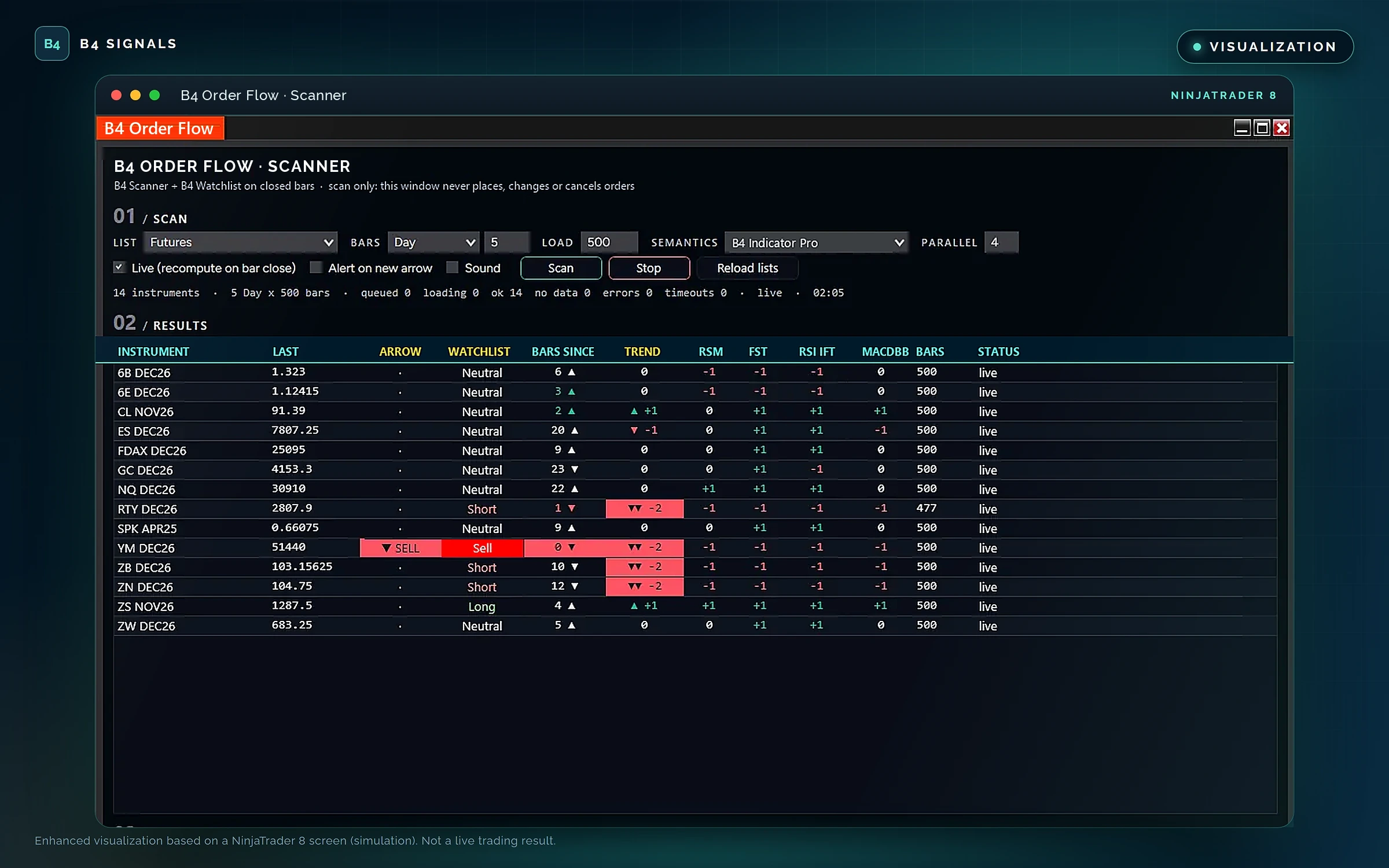
Enhanced visualizations based on NinjaTrader 8 screens from a simulation account (Sim101).
The Scanner — Find the conditions. Focus your analysis. Let the evidence guide your next review.
For educational and research purposes only. Not trading advice. Scanning results and indicator signals do not guarantee valid setups or profitable outcomes. Features may vary by release.
B4 CoPilot Pro is the strategy execution engine of the B4 Signals ecosystem for NinjaTrader 8. It brings together supported order-flow signals, market-condition filters, trend analysis, indicator-generated signals, and trade-management controls so traders can configure and run trading workflows around their own rules.
Through B4 API integration, CoPilot Pro can consume supported indicator signals exposed through the API, allowing compatible indicators to contribute their signals and confirmation information to the execution workflow—without requiring every signal source to be a native CoPilot Pro indicator.
CoPilot Pro connects analysis to action, evaluating each incoming signal against the conditions you define before a workflow responds.
Connects compatible indicator signals exposed through the B4 API to CoPilot Pro workflows, so indicator-generated signals contribute to analysis and trade-condition evaluation.
Works with multiple compatible indicator signal providers, subject to API compatibility and signal definitions.
Combines supported buying and selling pressure, delta, footprint, and market-depth information to evaluate developing market conditions.
Combines supported signals and filters according to your configured conditions before a workflow responds.
Evaluates directional trends and changing market conditions using the features available in your release.
Uses compatible analytical filters to check whether incoming signals meet your configured requirements.
Supports trade-management workflows and controls within NinjaTrader 8.
Connects with compatible B4 analytical tools and signal sources through the B4 API.
Confirmations from B4 Confirmation flow straight into CoPilot Pro. Off by default; switch it on when you use a confirmation chart. While a relay is in use, entries are allowed only on Sim101 and Playback101. Arrives with B4 V4, after NinjaTrader approval.
One entry per account and instrument, even when a signal doubles or a second CoPilot runs on the same account, and every signal logged as taken or not taken, with the reason. The B4 Order Flow tape shows whether CoPilot is armed. Arming rules are unchanged: CoPilot never trades unless it is armed. Arrives with the new build, after NinjaTrader approval.
CoPilot Pro creates a common integration path for indicator signals while preserving the distinction between generating a signal, evaluating its conditions, and authorizing an execution action.
API availability alone does not make every indicator compatible: each integration exposes the required signal data and conforms to the supported B4 API contract.
CoPilot Pro acts only within the rules, filters, and trade-management settings you configure. Automated and assisted execution still carries risk, so validate any configuration in simulation or playback before trading live.
Each B4 tool has a distinct role; CoPilot Pro is where confirmed analysis becomes execution:
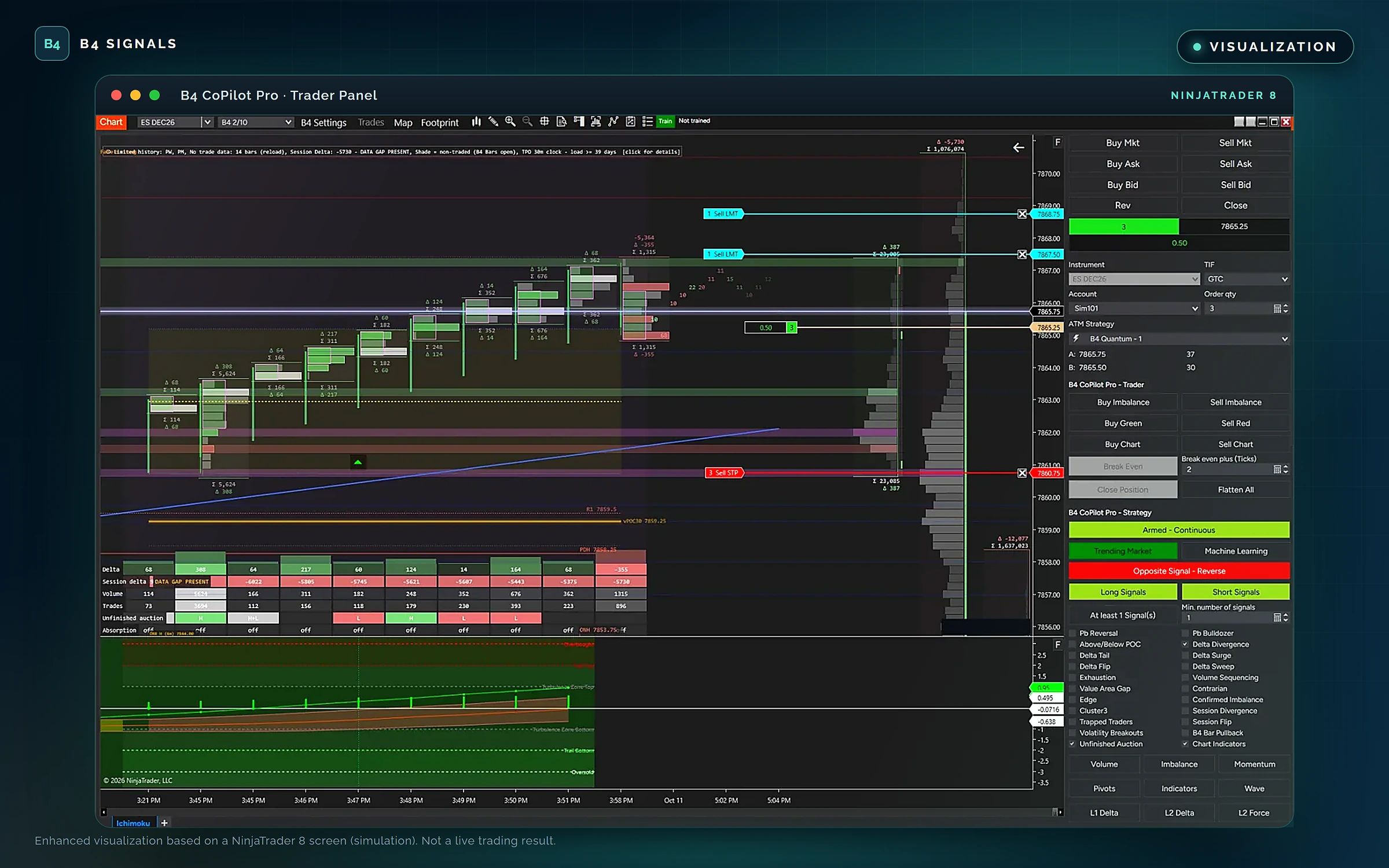
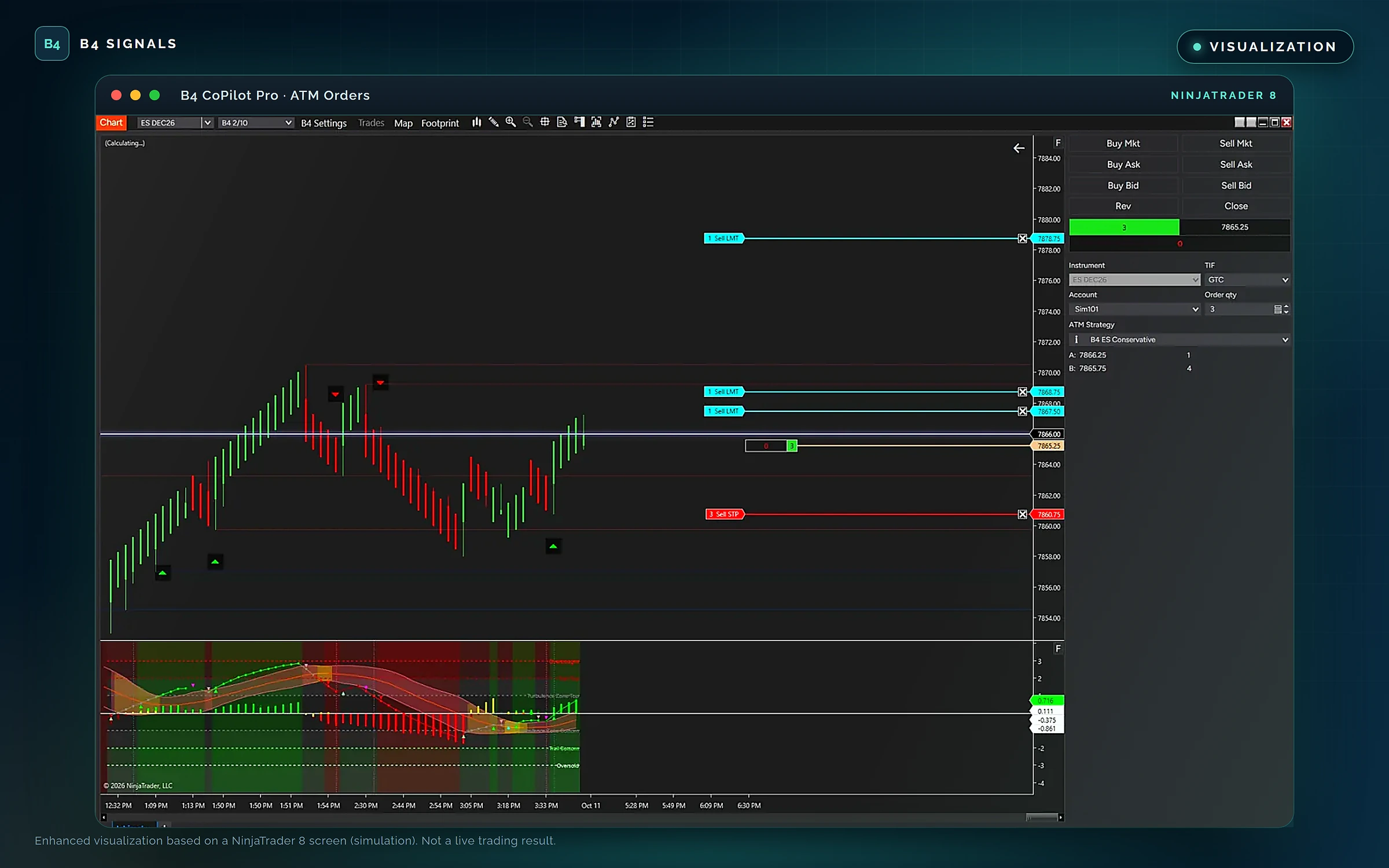
Enhanced visualizations based on NinjaTrader 8 screens from a simulation account (Sim101).
B4 CoPilot Pro — Connect indicator signals. Configure confirmation. Execute your strategy with discipline.
For educational purposes only. Not trading advice. Trading involves substantial risk. Indicator signals, filters, and automated or assisted workflows do not guarantee fills, execution quality, or profitable results. Features may vary by release.
B4 Funding is your gateway to elite trading, equipping you with institutional-grade tools, intelligent automation and expert-led training. It is the advanced futures prop desk of the B4 ecosystem, with community features and interactive learning built in.
Join the movement redefining what it means to trade funded.
A structured, performance-driven path from your first lesson to trading capital under the B4 banner.
Master the B4 methodology, from original Ichimoku structure to order flow, footprint and volume profile, through the self-paced B4 AMP education program.
Trade the full B4 ecosystem in simulation with daily journaling, strategy testing and performance benchmarks on the B4 Leaderboard.
Complete your assessments, evaluation scorecard and a strategy review interview modeled on a real funding panel to earn certification.
Top performers are invited to pursue capital allocation through B4 Funding and trade under the B4 banner.
For educational purposes only. Not trading advice. Funding eligibility is based on evaluation results and B4 Funding program criteria; no participant is guaranteed funding, capital allocation or profits. Trading involves substantial risk.
Ten focused tools for NinjaTrader 8, each built for one job. Pick what you want to do, and the B4 tool that does it. Together they turn market noise into a clear, repeatable process: read the market, see the order flow, find the setup, and execute with discipline.
B4 Quantum, the AI trade desk, is coming soon to the field.
B4 Algo Pro, B4 Ichimoku and B4 Indicator Pro map trend, Ichimoku structure, momentum and P and Y patterns, and B4 PriceLine keeps your levels on the price, so you know the conditions before you place a trade.
B4 Auction Pro shows where the volume traded and who was in control at every price, while the tape in B4 Order Flow talks you through the evidence with its audio squawk box.
The scanner in B4 Order Flow surfaces the instruments worth your attention, and its DOM shows you the liquidity waiting at every level.
B4 CoPilot Pro, the strategy execution engine, acts on your rules and confirmation, and B4 Confirmation brings in a second chart's view. Prefer to drive? B4 Order Flow puts stop, exit and flatten controls at your fingertips.
Replay sessions, track outcomes and work through the lessons in B4 Order Flow's tape, so every session makes the next one sharper.
Size-tiered time and sales, 36 tape-reading detectors and spoken callouts for sweeps, absorption, refills and tape speed.
Volume profile, point of control, value area, switchable TPO and footprint imbalances at every price.
Every B4 tool feeds the tape, DOM and scanner, with a live readout of which tools are reporting on your instrument.
Each of the 224 spoken commentary lines is explained in plain English, with its directional read.
Liquidity strength lines, trails, bubble markers and hold-or-fail states on your chart. On presale.
Level II depth with stacking and pulling, liquidity walls and order-book imbalance.
Optional GEX levels in the DOM: the gamma flip, call wall and put wall, each labeled with its source and time. Off by default.
Scan a futures list for B4 signals, trend and squeeze conditions on closed bars.
Trend, Ichimoku and VWAP context, machine-learning signals and 24/7 B4 Brackets.
Squeeze and release detection, MACD-BB bands, the Trend Cloud and overbought and oversold zones in one lower panel.
P and Y patterns, Chikou Span analysis, Shoyu and Wave structure and the KISS Pro read.
A clean price line with its halo, support and resistance, and stop and target levels.
Check a setup against a second chart before your strategy responds.
Strategy execution with multi-signal confirmation and trade management.
B4 CoPilot Pro logs every signal as taken or not taken, with the reason, and the tape shows whether CoPilot is armed.
Stop, break-even, trail, exit and flatten controls on the DOM ladder.
Market briefings, evidence fusion and explainable decisions. Coming soon.
The B4 bar type behind the B4 charts, templates and lessons.
Order-flow, execution and indicator tools are usually sold one at a time. Here is what the same categories cost elsewhere, compared with a single B4 membership.
Ranges from public price lists of other trading-tool vendors, checked October 2026. Prices elsewhere change; features are not identical across vendors.
The AI Automated Trade Desk brings every B4 tool into one intelligent workspace: AI market briefings, evidence fusion, explainable decisions and automated execution through B4 CoPilot Pro.
An AI trade desk built to read the market like a disciplined professional: gather the evidence, weigh it, explain it, and act only when the case is strong enough. Quantum decides, B4 Order Flow explains and gives you control, and B4 CoPilot Pro executes.
Behind the desk, the Quantum Research Lab handles strategy research and validation.
The whole B4 Ichimoku method on one chart: professional P and Y patterns with Chikou Span analysis and a Trade Manager panel, plus the KISS Pro, Wave and Shoyu modules.
Trading blogger, YouTuber or community leader? Earn 15% of every subscription payment from the traders you refer, for as long as their account stays active. You get credit for any purchase within 90 days of a click, commissions are paid monthly via PayPal, and promotional materials and affiliate support are included.
In their own words, from the B4 community over the years.
Historical testimonials. The live trade room has been discontinued and is not a current B4 offering.
Testimonials reflect individual experiences and do not guarantee future trading results. They come from real B4 community members, are not typical results, and are for educational purposes only. Not trading advice.
See what each B4 tool does, how the tools work together in The B4 Quantum Field, and what's coming next.
Open any product for its full description, then see the tools in action in NinjaTrader 8.
Browse products →See the platform the B4 lineup runs on.
View platforms →See how the AI Automated Trade Desk connects the entire B4 ecosystem.
See what's next →
Founder, B4 Signals
B4 Signals builds the indicators, order-flow tools, strategy execution engine and education that B4 members use in NinjaTrader 8.
Explore the B4 lineup and choose the membership that fits your trading.
Know the trend, the levels and the context before you take a trade.
Traders who want one trusted read of the market before anything else goes on the chart.
Availability: Presale · ships after NinjaTrader approval.
The Integrated B4 Trading Analysis and Signal Engine
B4 Algo Pro is the core indicator and analytical engine of the B4 Signals ecosystem, available for NinjaTrader 8. It consolidates B4's proprietary indicator technology, market analysis, trend evaluation, signal generation, and integrated trading-context functionality into a unified analytical framework.
B4 Algo Pro is designed to do more than display indicator readings. It provides analytical information that can integrate with B4 Order Flow and compatible B4 tools to help traders interpret market conditions, evaluate trade opportunities, manage trade context, and spot trend exhaustion.
B4 Algo Pro is the foundation; compatible B4 tools extend how its analytical information is presented and used. B4 Order Flow brings a market-analysis tape, an execution-focused DOM and a market scanner together in one window. B4 Brackets, the HUD and exhaustion markers complement the broader analytical and trade-management workflow where supported.
B4 Algo Pro — One core analytical engine. Integrated market intelligence. A connected B4 trading workflow.
For educational and research purposes only. Not trading advice. Trading involves substantial risk, and analytical signals or exhaustion markers do not guarantee results.
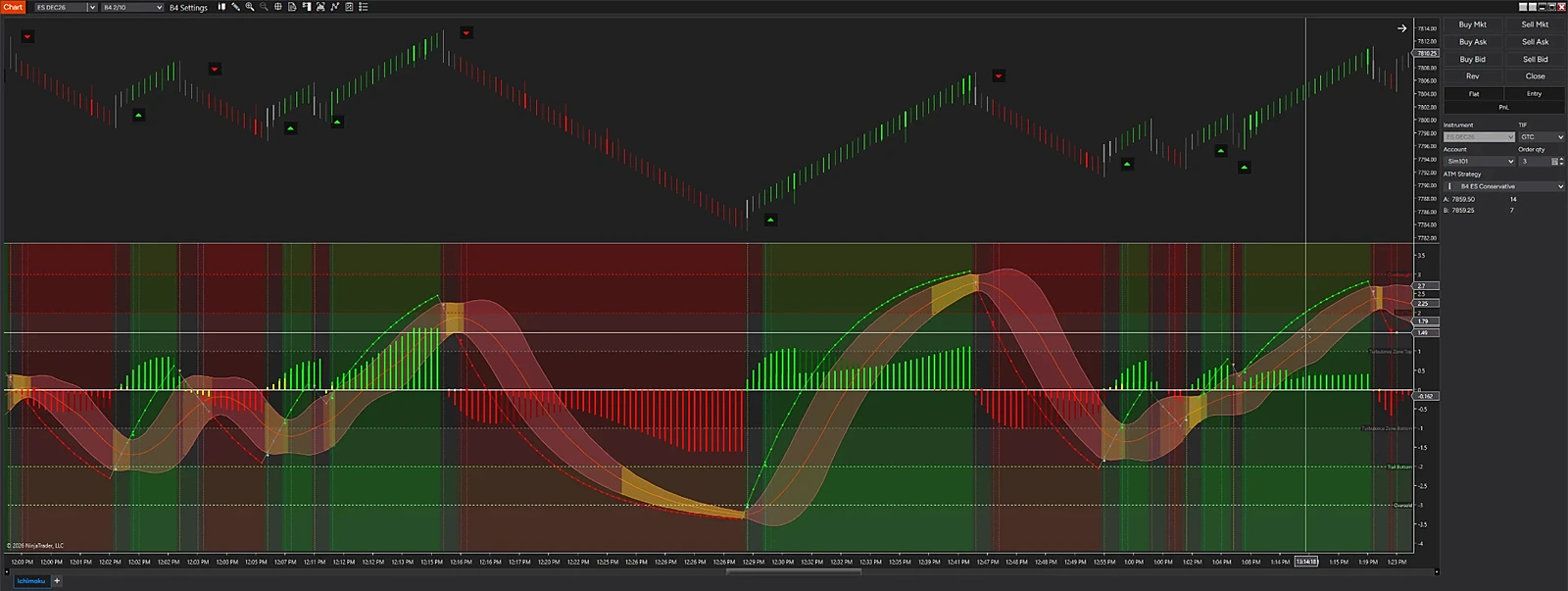
VISUALIZATION · Enhanced visualization based on a NinjaTrader 8 screen from a simulation account (Sim101). Not a live trading result. Select an image to open it full size.
Precision Squeeze Detection. Explosive Momentum. Breakout Intelligence.
Traders who want to find the compression, read the momentum and plan the breakout in one panel.
Availability: Presale · ships after NinjaTrader approval.
Precision Squeeze Detection. Explosive Momentum. Breakout Intelligence.
Find the compression. Read the momentum. Attack the breakout.
B4 Indicator Pro is an advanced momentum and breakout indicator for NinjaTrader 8. It helps you identify compression, detect developing momentum and expose potential volatility expansion, and it gives you more than one way to read a developing directional move.
It is built on MACD-based Bollinger Bands, squeeze and release detection, Trend Line analysis, a momentum histogram and overbought and oversold zones, all in one lower chart panel. Together they give you a framework for before, during and after a momentum breakout.
B4 Indicator Pro uses B4's own adaptive squeeze. A squeeze starts when the MACD-BB band width ranks among the narrowest 15 percent of its last 500 bars, and it ends only when the width is back above the 35 percent mark, so it holds steady instead of flickering on and off. All three values are settings. The panel follows each squeeze from the first compressed bar to the release.
A squeeze is not a trade by itself.
When a squeeze releases, B4 Indicator Pro shows what the breakout is doing: its direction, its strength and how the Trend Line behaves around the bands.
Use it for entry timing, confirmation and continuation, alongside your own plan.
The Trend Line has five states: bullish strengthening, bullish weakening, gray, bearish weakening and bearish strengthening. When the Trend Line turns gray, momentum is neutral or transitional: it is inside the bands, or flat at a band. When it moves back across a relevant band, a new opportunity may develop. Monitor:
The complete setup, not a color change in isolation.
Three ways to read the same panel. They are reading methods, not separate signals or settings:
The MACD (12, 26, 9) histogram in four colors: positive and rising, positive, negative and falling, and negative. It shows:
Six zone lines frame the extremes of the Trend Line: Overbought, Trail Top and Turbulence Zone Top above zero, and Turbulence Zone Bottom, Trail Bottom and Oversold below, with an optional fill and labels. Built-in values for ES, MES, NQ and MNQ, and you can set your own levels on any chart.
An extreme is not an automatic reversal signal. Strong trends can stay extended.
An alternate view of the same momentum. A B4 Surge is a run of bars in which the Trend Line pushes one way. Each Surge bar's height shows how much volume drove the push, measured against what is normal for that time of day, so a surge at the open and a surge at lunch are on the same scale. A Surge bar turns half-transparent when the push is fading. The Calm Zone shades the bars where the Trend Line is neutral: inside the bands or flat. Show B4 Surge on its own or inside the standard panel.
When a move starts to fail, the panel shows it: the Trend Line turns from strengthening to weakening, the histogram fades, the Trend Cloud is lost, or the Trend Line curls against the move.
Treat it as a warning condition, not a certainty.
Configurable NinjaTrader alerts, off by default, each with its own switch, a master switch and an optional sound:
Most indicators show you what the market is doing. B4 Indicator Pro helps you evaluate how momentum is changing, and where the next opportunity may develop.
No forced direction. No dependence on a single signal. No assumption that every breakout will succeed.
Detect the squeeze. Track the momentum. Identify the setup. Execute with a plan.
B4 Indicator Pro. Built for the move. Designed for the trader.
For educational and research purposes only. Not trading advice. Trading involves substantial risk, and indicator signals do not guarantee results.
See the auction: where the volume traded and who was in control at every price.
B4 Footprint Pro is now B4 Auction Pro. Members use B4 Footprint Pro (the current build) today. B4 Auction Pro, with the volume profile, TPO, squeeze, CVD divergence and CVD confirmation modules and the new liquidity tools, arrives with B4 V4 after NinjaTrader approval.
Off by default; they work in real time and need Level 2 market depth data.
Order-flow traders who read the market as an auction and want profile, footprint and liquidity on one chart.
Availability: Presale · ships after NinjaTrader approval.
Advanced Order Flow. Bid/Ask Analysis. Market Participation.
B4 Auction Pro is an advanced order-flow analysis tool designed to help traders examine buying and selling activity at individual price levels. By presenting detailed footprint information, it provides a granular view of executed trading activity to help evaluate order-flow imbalances, potential absorption, aggressive participation, and changes in market behavior.
Built for traders who want to look beyond conventional candles and volume bars, B4 Auction Pro focuses on the interaction between buyers and sellers within each bar, helping reveal details that may otherwise be difficult to interpret from price action alone.
Price movement tells only part of the story. Footprint analysis provides a closer look at the executed trading activity occurring within that movement.
B4 Auction Pro helps traders investigate whether buying or selling pressure is concentrated at particular prices, whether activity is producing meaningful price progress, and whether developing order flow supports further analysis of a potential setup.
Footprint readings must be interpreted in context. Delta, imbalance, and apparent absorption do not independently establish future direction or guarantee a successful trade.
B4 Auction Pro — Analyze bid and ask activity. Evaluate order-flow pressure. Read the market at price level.
For educational and research purposes only. Not trading advice. Trading involves substantial risk, and order-flow signals do not guarantee results.
VISUALIZATION · Enhanced visualization based on a NinjaTrader 8 screen from a simulation account (Sim101). Not a live trading result. Select an image to open it full size.
Price, its halo and the levels that matter. Nothing else.
Traders who like a clean chart that still knows where the levels are.
Availability: Presale · ships after NinjaTrader approval.
For educational and research purposes only. Not trading advice. Trading futures and equities involves substantial risk of loss. No indicator, strategy or AI tool can guarantee a trading outcome.
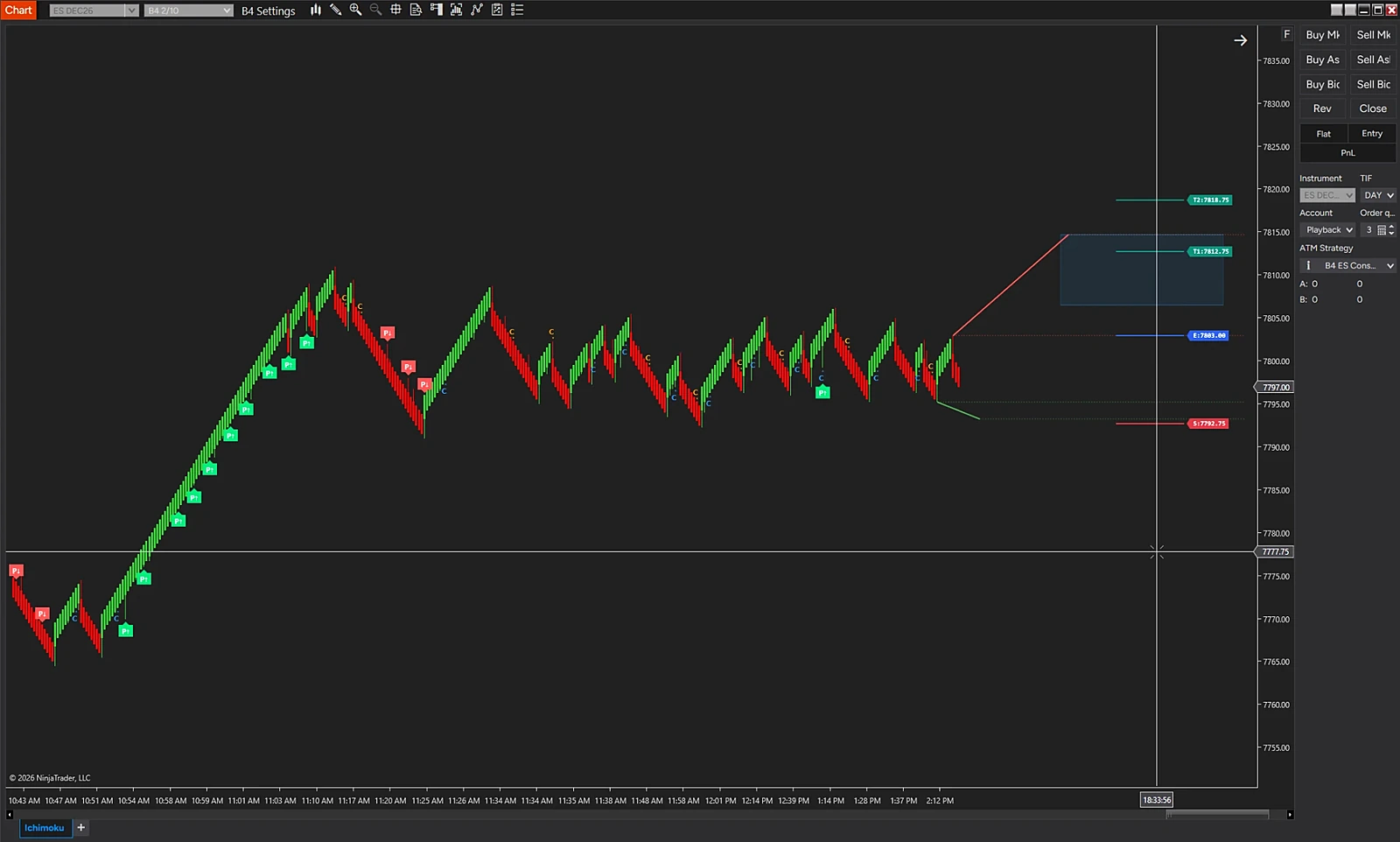
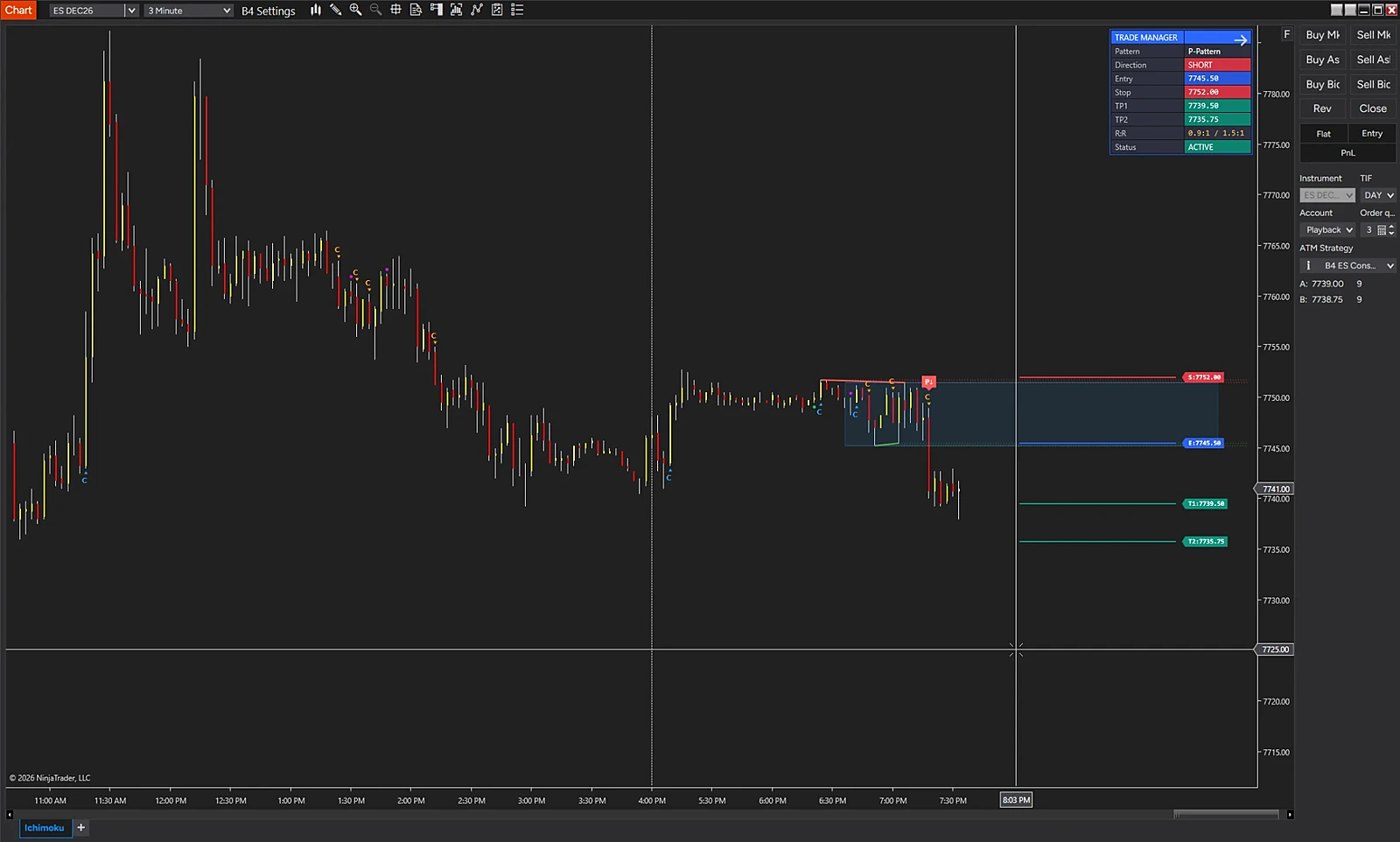
VISUALIZATION · Enhanced visualization based on a NinjaTrader 8 screen from a playback (market replay) account. Not a live trading result. Select an image to open it full size.
The whole B4 Ichimoku method on one chart.
Ichimoku traders who want trend, structure and patterns in one indicator.
Availability: Presale · ships after NinjaTrader approval.
For educational and research purposes only. Not trading advice. Trading futures and equities involves substantial risk of loss. No indicator, strategy or AI tool can guarantee a trading outcome.
Let a second chart confirm a setup before your strategy acts.
While a confirmation relay is in use, B4 CoPilot Pro enters only on Sim101 and Playback101 accounts. Validate any configuration in simulation or playback.
B4 CoPilot Pro users who confirm setups on more than one chart.
Availability: Presale · ships after NinjaTrader approval.
For educational and research purposes only. Not trading advice. Trading futures and equities involves substantial risk of loss. No indicator, strategy or AI tool can guarantee a trading outcome.
VISUALIZATION · Enhanced visualizations based on NinjaTrader 8 screens from a simulation account (Sim101). Not a live trading result. Select an image to open it full size.
Signals in. Discipline out. Your rules, run the same way every time.
Members use B4 CoPilot Pro today. The built-in confirmation relay, the duplicate-entry guard and the entry log arrive with the new build, after NinjaTrader approval.
Traders who want their rules carried out the same way, every time.
Availability: Available today.
Configurable Trade Assistance. Intelligent Order Flow. Integrated Indicator Signals.
B4 CoPilot Pro is the strategy execution engine of the B4 Signals ecosystem for NinjaTrader 8: a configurable trade-assistance and order-flow workflow engine. It brings together supported order-flow signals, market-condition filters, trend analysis, indicator-generated signals, and trade-management controls to help traders configure and evaluate trading workflows around their own rules.
Through B4 API integration, CoPilot Pro can consume supported indicator signals exposed through the API, allowing compatible indicators to contribute their signals and confirmation information to the broader trading workflow. This creates an extensible framework for integrating indicator-based analysis without requiring every signal source to be a native CoPilot Pro indicator.
B4 CoPilot Pro is designed to bring compatible indicator signals into a configurable trading workflow. With B4 API integration, the system can use signals exposed by supported indicators as inputs for analysis, confirmation, and other approved workflow actions.
This approach creates a common integration path for indicator signals while preserving the distinction between generating a signal, evaluating its conditions, and authorizing an execution action.
API availability alone does not mean every indicator is automatically compatible. Each integration must expose the required signal data and conform to the supported API contract.
B4 CoPilot Pro — Connect indicator signals. Configure confirmation. Build a more integrated trading workflow.
For educational purposes only. Not trading advice. Trading involves substantial risk. Indicator signals, filters, and automated or assisted workflows do not guarantee profitable results.

VISUALIZATION · Concept image. Not a live trading result. Select an image to open it full size.
The AI Automated Trade Desk. Coming soon.
B4 Quantum's models will improve through shared trading data from participating members. Members will be able to voluntarily opt in to share their Sim trading results when this feature is released. Those contributions will help train and refine the ecosystem's models, benefiting all B4 members. Data sharing will be optional and can be disabled by the member.
All members benefit from collective model improvements; only members who explicitly opt in contribute their Sim results.
Members who want the whole B4 toolkit working together as one desk.
Availability: Coming soon.
Introducing a New Era of AI-Powered Trading Intelligence.
B4 Quantum is the next evolution of the B4 Signals ecosystem: an AI trade desk built to read the market the way a disciplined professional does—gathering the evidence, weighing it, explaining it, and acting only when the case is strong enough.
It brings the entire B4 family into one intelligent workspace. B4 Algo Pro, B4 Indicator Pro, B4 Ichimoku, B4 Auction Pro and the order-flow evidence from B4 Order Flow feed a single decision engine, while B4 CoPilot Pro—the B4 strategy execution engine—turns confirmed decisions into rules-based action.
Fast enough to watch everything. Disciplined enough to wait.
Powerful analytical tools. Structured process. Meaningful evidence. Disciplined execution. B4 Quantum is designed to bring all four together in one AI-driven trade desk—and to keep getting smarter as the B4 ecosystem grows.
B4 Quantum — AI Automated Trade Desk. Intelligence. Integration. Automation.
Coming soon. Not for sale yet.
For educational and research purposes only. Not trading advice. Features described may change before release. AI-generated analysis and automated trading technology cannot guarantee market direction, execution quality, or profitable results. Automated trading carries substantial risk, including losses from technology failures, slippage, and data errors. Features and availability are subject to the final release.
VISUALIZATION · Enhanced visualizations based on NinjaTrader 8 screens from a simulation account (Sim101); window titles updated to the current product name. Not a live trading result. Select an image to open it full size.
Hear the tape, see the liquidity and find the next setup, in one window.
Scroll down this page for the full tour of each view.
Order-flow traders who live in the tape and on the ladder.
Availability: Presale · ships after NinjaTrader approval.
For educational and research purposes only. Not trading advice. Trading futures and equities involves substantial risk of loss. No indicator, strategy or AI tool can guarantee a trading outcome.
VISUALIZATION · Enhanced visualization based on a NinjaTrader 8 screen from a simulation account (Sim101). Not a live trading result. Select an image to open it full size.
Build your charts on the same bars as the B4 charts and lessons.
Traders who want their charts to match the B4 charts, templates and lessons.
Availability: Available today.
For educational and research purposes only. Not trading advice. Trading futures and equities involves substantial risk of loss. No indicator, strategy or AI tool can guarantee a trading outcome.